Zedge™ Wallpapers & Ringtones
- 4.7
- Rating
- 500.00M
- Installs
- Free
- Price

 Analysis by App-foxy
I use my phone as both a practical tool and a small expression of personality, so a wallpaper or ringtone app can be more useful than it first appears. Zedge™ Wallpapers & Ringtones brings those two customization jobs together, while also offering tools to make original material with AI. It is a free personalization app from Zedge, aimed at Teen users, and it has become a very familiar name in this space.
My overall impression is that it works best when I want variety quickly, rather than when I already have one exact image or sound in mind. There is a lot to browse, but that abundance comes with the usual need to filter carefully. I would recommend it to someone who enjoys changing a phone’s look often, although I would not install it casually without first checking the choices presented during setup and while saving content.
What using the app feels like in everyday life
The first strength is convenience. Instead of searching separately for a lock-screen image, a home-screen background and a notification sound, I can explore all of them in one place. That makes the app especially handy when I want to refresh a phone in a few minutes. I might choose a calm illustration for the lock screen, a less busy pattern for the home screen and a short sound that is easy to recognize in a noisy room.
In-Depth Coverage of Zedge™ Wallpapers & Ringtones
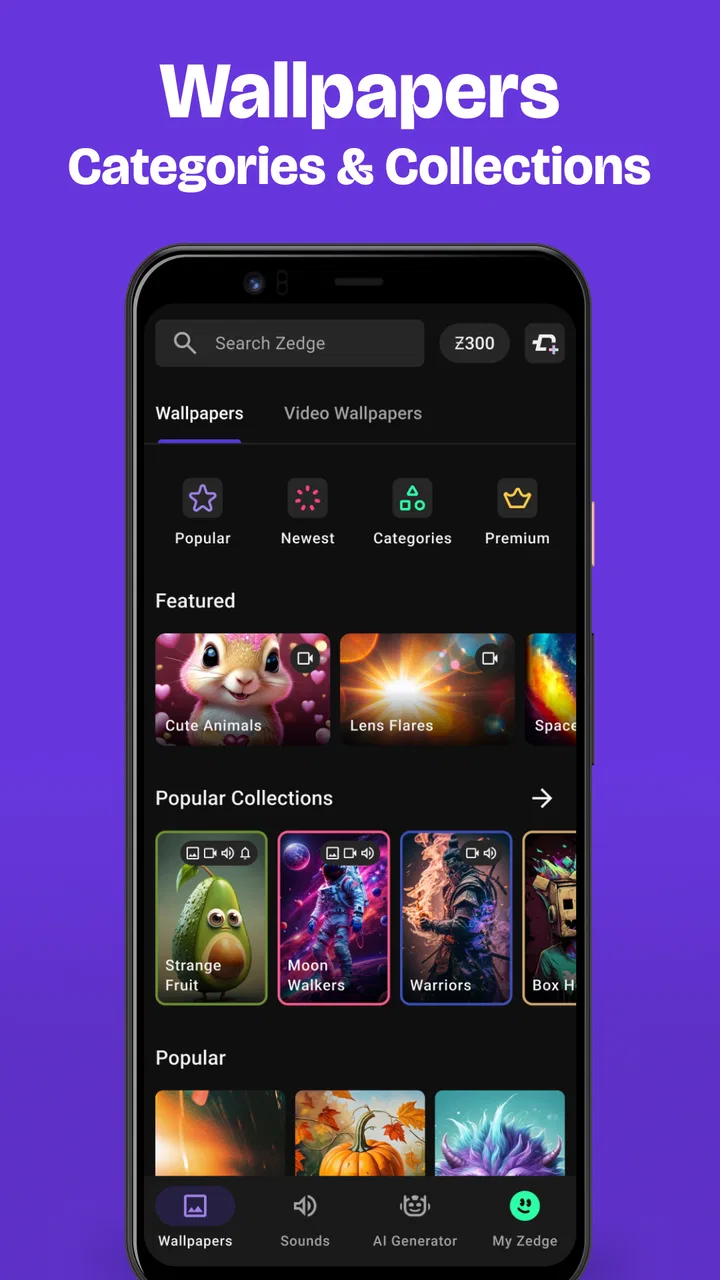
The catalog is broad enough to support very different moods. Someone may prefer photography, abstract artwork, seasonal designs, humorous images or darker themes, while another person may mainly use the ringtone section. I found that browsing works better with a clear purpose. Opening the app just to “see what is there” can turn into a long scroll, whereas deciding first whether I need a background, alarm sound or notification tone makes the experience much more manageable.
The app’s scale is reflected in its audience: it has passed 500 million installs and holds a 4.7 average from around 17 million ratings. Those figures show that the concept has wide appeal, but they do not remove the need for personal judgment. A large catalog can contain excellent choices and plenty of material that simply does not suit my taste.
In practical use, I would treat the home screen and lock screen as separate design problems. A detailed picture may look attractive in a preview but become distracting once icons and widgets cover it. I prefer to reserve busier artwork for the lock screen and use simpler designs behind app icons. This small distinction saves time and makes the final result feel more intentional.
Finding something useful instead of endlessly scrolling
My most effective workflow is to search by a visual idea rather than by a vague mood. Terms connected to color, subject or style usually narrow the browsing process more effectively than simply looking through popular material. I also pause before applying anything to check how the image will sit behind the clock and icons. A design that looks balanced in a full-screen preview may place its main subject exactly where the phone’s interface hides it.
For sounds, I listen with the intended purpose in mind. A tone that is entertaining once can become irritating after repeated notifications. I would choose something brief and distinctive for alerts, reserving more expressive sounds for calls or alarms. This is one area where the app’s variety is both helpful and slightly overwhelming: it gives me options, but it does not decide which choice will remain comfortable after a week of daily use.
A useful habit is to make one change at a time. If I replace the wallpaper, ringtone and notification sound together, I cannot easily tell which change improved the phone and which one made it feel cluttered. Testing a single element also makes it easier to return to a familiar setup if the new choice does not work in real life.
AI creation is interesting, but not automatically better
The ability to make original material with AI gives the app a different role from a simple download library. I see the appeal when I want a background built around a personal combination that is difficult to find in a ready-made collection. For example, I might want a restrained landscape using a particular color family, rather than another broadly themed image.
At the same time, generated artwork needs a more critical eye than a finished photograph or illustration. I would inspect small details, edges and the area where interface elements will appear. A visually impressive image can still be awkward as a phone background if its focal point is poorly placed or if the contrast makes text difficult to read. In my experience, AI is most useful as a way to explore ideas, not as a guarantee of a perfect result.
There is also a practical trade-off between originality and speed. Browsing a ready-made design is faster when I need a change immediately. Creating something personal makes more sense when the phone is meant to reflect a specific interest, event or color scheme. I would not use the AI option simply because it exists; I would use it when the existing selection does not match what I have in mind.
Trust, controls and the choices I would check
I would also check how much control the app gives me over the experience after the first browse, rather than treating setup as a one-time decision. I’d revisit notification and permission choices if my habits change, and pause at any account or payment screen to decide whether that step genuinely helps. That small routine keeps convenience from turning into automatic consent.
You May Also Like

 AccuWeather: Weather Radar
AccuWeather Review: A Quick, Clear Forecast for Everyday Decisions
For everyday plans, the best forecast is the one you can understand quickly. AccuWeather makes rain timing, radar, and local conditions easy to act on, with a few trade-offs.

 Hill Climb Racing
Why Hill Climb Racing Still Turns Crashes Into One More Run
A tiny car, a bumpy hill and one more upgrade: Hill Climb Racing keeps resurfacing because its simple chaos makes every near-miss feel personal.

 AliExpress - Shopping App
AliExpress Makes Global Shopping Feel Personal, but Shoppers Bear the Risk
AliExpress turns a global marketplace into a pocket-sized discovery engine. Its reach is useful, its shopping loop compelling, and its trade-offs easy to miss.

 Lords Mobile: Kingdom Wars
Lords Mobile Is a Kingdom-Building Routine, Not a Quick Match
A case-by-case verdict on the building, battles, device demands, and social commitments that make Lords Mobile rewarding for some players and exhausting for others.

 PDF Scanner app - TapScanner
TapScanner Makes Paperwork Easier to Capture, Check, and Share
TapScanner makes scanning with a phone feel less like a rescue operation and more like a dependable step in getting work done. Its capture tools are useful, though not flawless.

 Block Blast!
Block Blast! Shows How Much a Puzzle Game Can Leave Out
A quiet grid game shows why puzzle players increasingly value instant clarity, repeatable skill and low-pressure play—and where the genre still needs to catch up.
More From Our News Desk
View All News


Why the app deserves a careful first look
The app is free to install, which lowers the barrier to trying it, but it includes purchases priced from 49 cents to $399.99 per item. That wide range makes the payment path worth reading rather than tapping through automatically. I would pay attention to whether an item is free, part of a paid option or connected to another purchase choice before confirming anything.
This is not a reason to avoid the app; it is simply the kind of detail that matters in a personalization product. Wallpapers and ringtones can feel like low-stakes content, so it is easy to move quickly through prompts. I prefer to slow down at any screen involving payment, account access or a request to use information beyond what I expected.
The current version is 9.4.1 and it requires Android 9 or later. That is useful to know before spending time setting up a collection, particularly if I am using an older phone. Compatibility is not only a technical detail: an app that cannot run properly on a device is not a practical recommendation, regardless of how attractive its catalog may be.
Permissions, account choices and visible control
When I evaluate an app like this, I look at permissions at the moment they appear instead of assuming that every request is necessary. I want to understand what I am allowing and whether the request matches the action I am trying to perform. If I am only browsing backgrounds, I would be cautious about granting access that seems unrelated to browsing or applying a design.
I also look for clear choices around accounts and personalization. If an account is optional for the task I want to complete, I prefer to continue without creating one. If the app presents settings for notifications, recommendations or saved content, I would review them before settling into regular use. The important point is that I should be able to make those decisions consciously rather than treating every prompt as part of the installation.
My advice is simple: read each permission and consent screen in context, and revisit the phone’s system settings if I change my mind later. This approach does not require technical expertise. It just prevents the common mistake of accepting every request quickly and forgetting what was enabled.
Moments when data awareness matters most
The most sensitive moments are not necessarily the ordinary browsing sessions. They are the points where I create an account, personalize recommendations, save content or use AI creation. Those actions can make the experience more tailored, but they also deserve a closer look at the choices shown on screen. I would avoid entering personal details merely to explore a wallpaper catalog.
AI creation also changes the way I think about input. I would keep prompts general and avoid including private information, names, addresses or details that do not belong in a creative request. A prompt such as a color palette and a broad subject is enough for experimentation. There is rarely a good reason to turn a personal document, private photograph or sensitive situation into a casual creative prompt.
Notifications are another small but meaningful control. A personalization app can be more enjoyable when I open it deliberately, rather than being pulled back by frequent alerts. I would disable notifications that do not help me and keep only those I genuinely find useful. This makes the app feel like a tool I choose to use instead of a source of background interruption.
Where it beats simpler alternatives, and where it does not
Compared with using the phone’s built-in wallpaper picker, this app offers far more discovery and combines backgrounds with sounds. That is its clearest advantage. The built-in option is usually better when I already have a photo saved locally and want a quick, uncomplicated change without browsing a large catalog.
Compared with a dedicated ringtone editor, the app is more convenient for finding ready-to-use sounds, but it may not be the best choice when I want precise control over a personal audio file. A specialist editor is more appropriate for trimming a recording or shaping a tone exactly. I would choose this app for discovery and convenience, not for detailed audio production.
Compared with a focused wallpaper collection, it offers more categories and more ways to customize, but the larger selection can make quality and style feel inconsistent. A focused source may be preferable if I want a tightly curated visual identity. In contrast, Zedge is a better fit when I enjoy exploring, switching themes and comparing several possibilities before deciding.
Who should use it, and who should skip it
I think it suits people who change their phone’s appearance regularly, want wallpapers and ringtones in one app, or enjoy experimenting with generated artwork. It is also useful for someone setting up a new phone and looking for a quick starting point rather than collecting individual files from unrelated places.
I would be more cautious about recommending it to someone who dislikes advertising or promotional prompts, wants a completely minimal interface, or prefers to keep every customization file locally organized. The large catalog may feel like unnecessary noise for a person who already has a personal photo library and a favorite sound editor.
I would also skip it for a child unless an adult has reviewed the age guidance and the available controls first. The app carries a Teen content rating, so that label should be treated as part of the decision rather than ignored simply because the main activity appears to be changing a background.
My practical setup routine
When I install a personalization app, I first browse without rushing into customization. I check how content is organized, whether the item I want is clearly identified as free or paid, and which settings are available. Then I choose one wallpaper and test it through a normal day. This reveals problems that a preview cannot, such as poor clock contrast, distracting detail or an image that makes icons difficult to find.
For sounds, I test the tone at the volume I normally use and in the places where I often receive calls. A sound that stands out at home may be too sharp in an office or public space. I also avoid choosing similar tones for calls and notifications, because separating them helps me know what happened without looking at the screen.
Finally, I review the app’s settings after I have used it for a while. I remove notifications I do not need, reconsider account-related options and check the phone’s permission controls. This routine takes only a few minutes, but it gives me much more control than accepting the default setup and forgetting about it.
My cautious verdict
I like the app because it makes phone customization feel immediate and playful. The combination of a broad wallpaper and ringtone selection with AI creation gives me more room to experiment than the standard tools on a phone. Its popularity is easy to understand, and the free entry point makes it simple to try before deciding whether it belongs in my regular setup.
My reservations are mainly about abundance and attention. I need to filter the catalog, think before accepting prompts, and stay alert around purchases and personal inputs. The app is not the right answer for every customization task: built-in tools are cleaner for a local photo, while dedicated editors are stronger for precise audio work.
For me, the best way to use it is selectively. I would install it when I want fresh ideas or a coordinated visual-and-audio refresh, keep my permissions and notifications under review, and use general prompts when exploring AI creation. With that approach, the strongest benefit is user choice without giving up everyday caution. It is a worthwhile personalization app for curious users, but it works best when I remain the one making the final decisions.
FAQs for Zedge™ Wallpapers & Ringtones
01What is Zedge™ Wallpapers & Ringtones and what does it offer?
Zedge™ is an app that provides a vast collection of wallpapers, ringtones, notification sounds, and icons for your Android or iOS device. Users can personalize their phone's appearance and sounds with thousands of options, ensuring a unique and customized mobile experience. The app is designed for easy navigation and offers both free and premium content.
02Is Zedge™ Wallpapers & Ringtones free to use?
Yes, Zedge™ offers a free version that includes access to a wide variety of wallpapers and ringtones. However, it also provides a premium subscription service that unlocks additional features, removes ads, and offers exclusive content. Users can choose to upgrade for a more enhanced experience if desired.
03How do I navigate the Zedge™ application to find content?
Navigating Zedge™ is straightforward. The app is organized into categories such as wallpapers, ringtones, and notification sounds. Users can browse through popular and trending items or use the search function to find specific themes or sounds. The user-friendly interface ensures that even newcomers can easily find and download their preferred content.
04Does Zedge™ Wallpapers & Ringtones affect device performance or battery life?
Zedge™ is designed to be lightweight and should not significantly impact your device’s performance or battery life. However, as with any app, excessive use may lead to minor battery consumption. Regular updates ensure optimization, so keeping the app updated can help maintain its efficiency on your device.
05Is content on Zedge™ Wallpapers & Ringtones safe and appropriate for all ages?
Zedge™ takes user safety seriously and strives to provide content that is suitable for all ages. The app curates its library to ensure that wallpapers and ringtones are appropriate. However, parental guidance is always recommended to ensure that younger users access content that is appropriate for them.
Pros
- Extensive library of wallpapers and ringtones.
- User-friendly interface with easy navigation.
- Regular updates with trending content.
- Customizable settings for personalization.
- Free to use with optional premium features.
Cons
- Contains ads that can be intrusive.
- Premium features require a subscription.
- Limited customization for some content.
- Occasional bugs during downloads.
- Requires internet for full functionality.

Zedge™ Wallpapers & Ringtones
Gallery